Magento 1 & OpenMage integration module for Basicrum

What does the Basicrum Magento 1/OpenMage module do?
The Basicrum module connects Magento 1 and OpenMage stores to a hosted or self-hosted Basicrum installation. It uses the bundled open-source Boomerang library to measure visitors' real browsing experience, including page loads, resources, interactions, and Core Web Vitals metrics.
The module also adds context to each beacon, including the page URL and page type. It recognises standard Magento storefront pages such as the homepage, categories, products, search results, cart, checkout, order confirmation, and customer account pages. This helps you investigate performance on the pages that matter to your customers.
Module setup
Installation
Download the latest installation package from the GitHub Releases page. Extract the ZIP and copy the contents of the basicrum-magento-1/ directory into your Magento root.
Alternatively, install the current release with Modman:
cd /path/to/magento
modman clone https://github.com/basicrum/basicrum-magento-1.git -- --branch v1.1.0
Clear Magento's configuration and layout caches after installation or upgrade.
Acquire Basicrum collector details
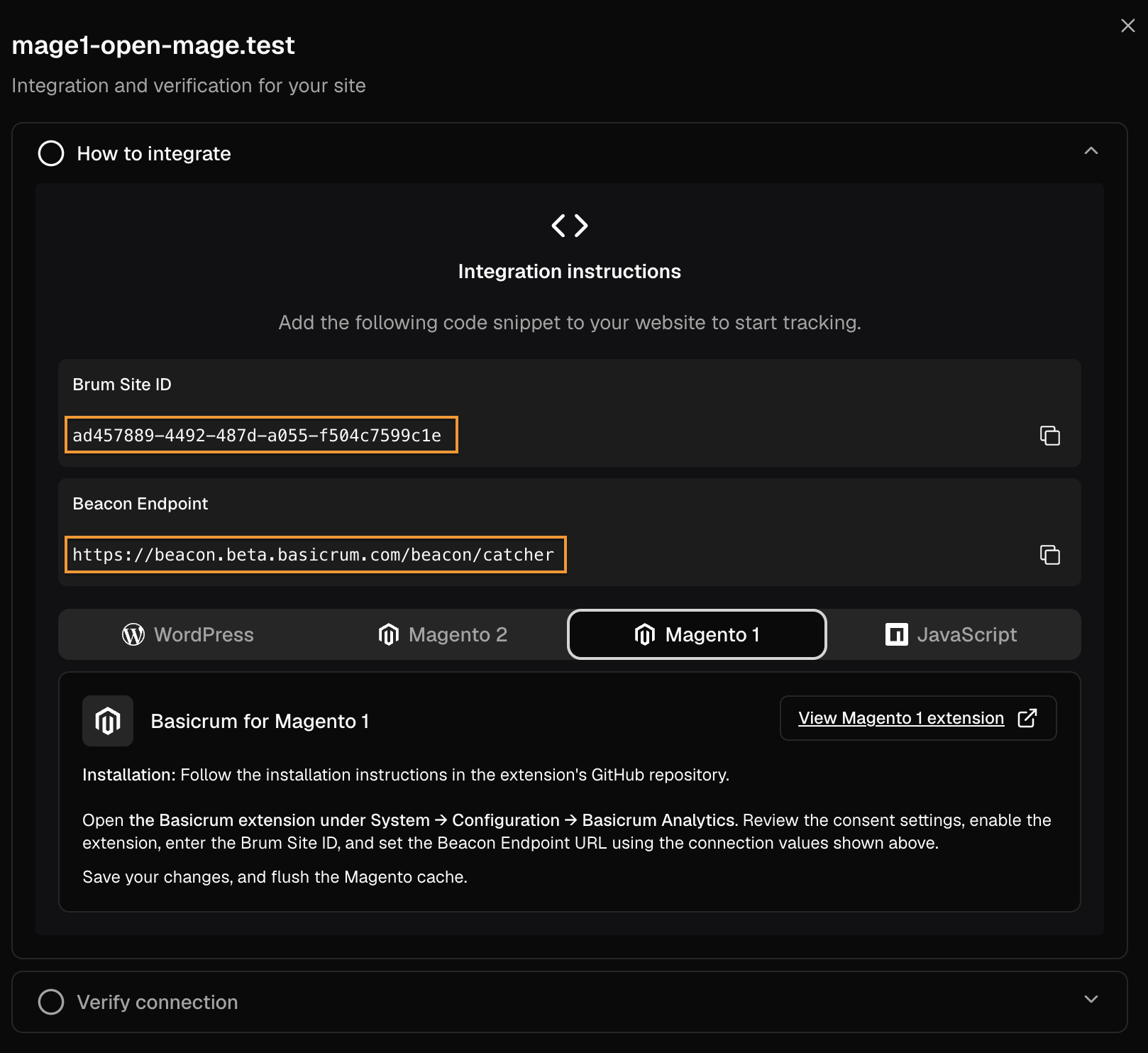
To connect your store to Basicrum, you need two settings:
- Beacon Endpoint
- Brum Site ID
During the public beta, create your account from the Basicrum signup page.
Once your account is ready, sign in to the Basicrum portal.
Go to Account → Settings → Sites, then click Add Site or select an existing site to retrieve its collector details.
Enable Basicrum in Magento
In the Magento admin, open:
System → Configuration → Basicrum → Basicrum Settings
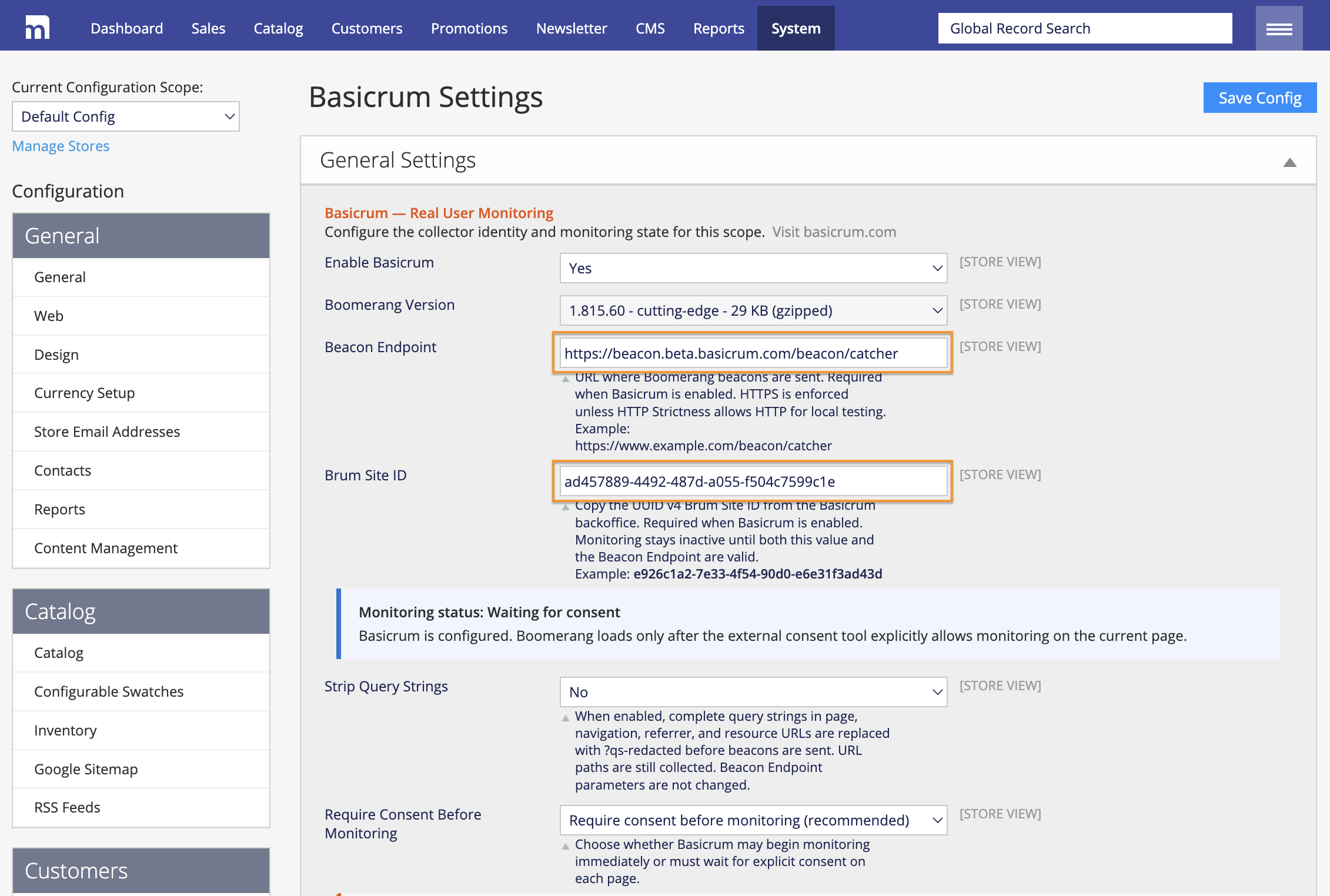
Set Enable Basicrum to Yes, then enter the Beacon Endpoint and Brum Site ID supplied for your site. Save the configuration.
Both values are required. The module does not load monitoring scripts or send analytics data when monitoring is disabled or either value is missing or invalid.
Settings support Magento's default, website, and store-view scopes, so you can configure individual storefronts where needed.
Connect your consent tool
On new installations, Require consent before monitoring is selected by default. In this mode, the module does not load Boomerang, create its monitoring cookie, or send monitoring data until your consent tool explicitly allows monitoring on the current page.
After opt-in, Boomerang loads, creates the first-party RT cookie, and sends performance data to the configured Basicrum collector.
Basicrum does not display a consent banner or store its own consent decision. Your existing consent tool remains responsible for obtaining the visitor's choice and communicating it to Basicrum on each page.
Use Monitor without consent only when the store owner has confirmed that prior consent is not required for the site.
Manual consent instrumentation
Connect your consent tool to Basicrum using these JavaScript callbacks.
Opt-in:
if (typeof window.OPT_IN_BASICRUM_LOADER_WRAPPER === "function") {
	window.OPT_IN_BASICRUM_LOADER_WRAPPER();
}
Call this when your consent tool confirms that monitoring is allowed or consent is retracted.
Opt-out:
if (typeof window.OPT_OUT_BASICRUM_LOADER_WRAPPER === "function") {
	window.OPT_OUT_BASICRUM_LOADER_WRAPPER();
}
Call this when monitoring is denied or consent is withdrawn. The callback removes cookies and disables Boomerang. Data already sent to the collector cannot be retracted.
Call these functions after the Basicrum loader has registered them near the end of the page. Calls made before registration are not queued.
If consent is withdrawn after Boomerang loading has started, granting consent again does not restart monitoring on that same page. Reload the page and let your consent tool communicate the updated decision.